
Difference: EditingProcessModules (2 vs. 3)
Revision 32009-12-13 - KatTrevor
| Line: 1 to 1 | |||||||||
|---|---|---|---|---|---|---|---|---|---|
Editing Process Modules | |||||||||
| Line: 10 to 10 | |||||||||
| Finally, the default Delay Type is triangular so you only need to adjust the Units and Minimum, Value and Maximum. However, you can change the Delay Type and setting it to Expression will enable you to use other distributions to describe the delay. | |||||||||
| Changed: | |||||||||
| < < | The attached flash movie shows how to edit Process modules. | ||||||||
| > > | 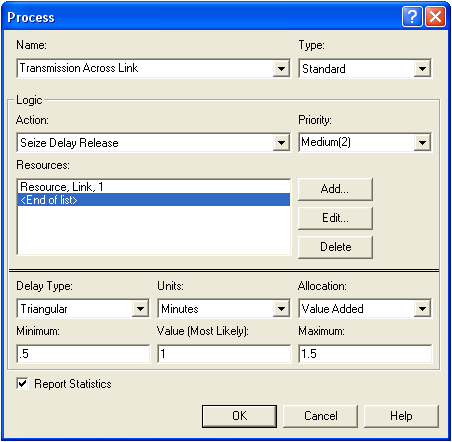 | ||||||||
| Changed: | |||||||||
| < < | Editing Process Modules | ||||||||
| > > | The attached flash movie shows how to edit Process modules: | ||||||||
| You may want to alter the queue animation associated with the Process module by lengthening it (click on the queue and drag its left end - if you hold down the Shift key the able is fixed to horizontal, vertical or 45 degrees diagonal). | |||||||||
| Changed: | |||||||||
| < < | Editing Queue Animation | ||||||||
| > > | |||||||||
| -- MichaelOSullivan - 18 Aug 2009 | |||||||||
| Deleted: | |||||||||
| < < |
| ||||||||
| Changed: | |||||||||
| < < |
| ||||||||
| > > | |||||||||
| |||||||||
| Added: | |||||||||
| > > |
| ||||||||
View topic | History: r15 < r14 < r13 < r12 | More topic actions...

 Copyright © 2008-2026 by the contributing authors. All material on this collaboration platform is the property of the contributing authors.
 Ideas, requests, problems regarding TWiki? Send feedback