
Difference: PrintingInAMPL (4 vs. 5)
Revision 52008-03-04 - MichaelOSullivan
| Line: 1 to 1 | |||||||||||||
|---|---|---|---|---|---|---|---|---|---|---|---|---|---|
<-- Under Construction --> | |||||||||||||
| Line: 28 to 28 | |||||||||||||
| ??? Up to here ??? | |||||||||||||
| Changed: | |||||||||||||
| < < | Displaying InformationYou have already seen how to display a variable using the {\tt display} command. We can also display {a href="Expressioins in AMPL">AMPL expressions the same way, e.g., we might want to see how supply we are using in a transportation problem.
| ||||||||||||
| > > | Displaying Information | ||||||||||||
| Changed: | |||||||||||||
| < < | Often when we display something (like variable values) many of the resulting numbers are 0 and we are only interested in the non-zero numbers. To stop any rows of zeros being displayed you can set the {\tt omit_zero_rows} option:
\begin{verbatim} | ||||||||||||
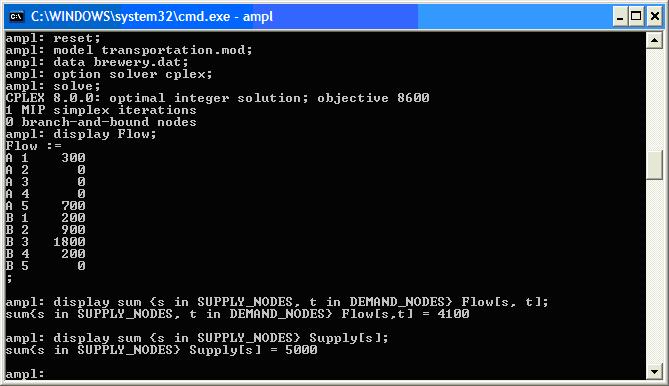
| > > | You have already seen how to display a variable using the display command. We can also display AMPL expressions the same way, e.g., we might want to see how supply we are using in a transportation problem.
src="display.jpg"
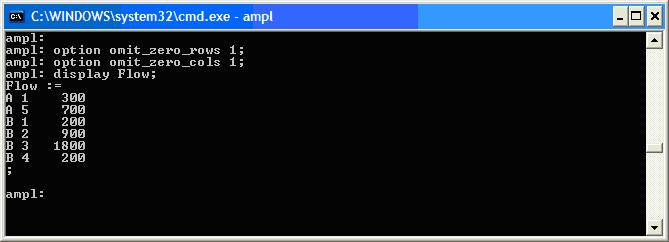
Often when we display something (like variable values) many of the resulting numbers are 0 and we are only interested in the non-zero numbers. To stop any rows of zeros being displayed you can set the omit_zero_rows option:
| ||||||||||||
| option omit_zero_rows 1; | |||||||||||||
| Changed: | |||||||||||||
| < < | \end{verbatim} To stop any columns of zeros being displayed you can set the {\tt omit_zero_cols} option: \begin{verbatim} | ||||||||||||
| > > |
To stop any columns of zeros being displayed you can set the omit_zero_cols option:
| ||||||||||||
| option omit_zero_cols 1; | |||||||||||||
| Changed: | |||||||||||||
| < < | \end{verbatim}
| ||||||||||||
| > > |
src="omit.jpg"
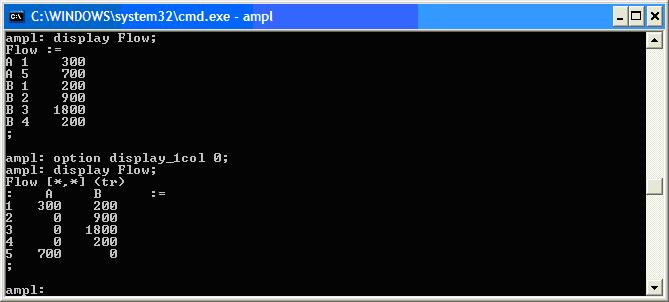
You can also force display to use either tables or a single column by using the display_1col option. This option will use one column if the number of values to display is less than display_1col. The initial value of display_1col is 20, so any display command that shows less than 20 values will be displayed as a column. Setting display_1col to 0 forces display to use tables whenever possible.
src="display_1col.jpg"
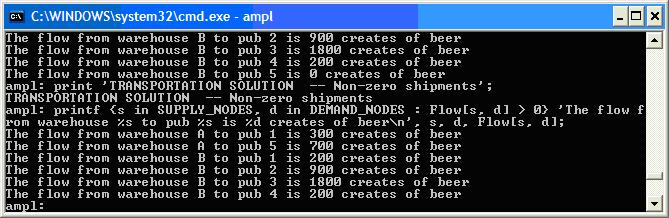
Printing InformationBy playing with thedisplay options we can get the display command to format output in a nice way. However, we can also decide exactly what is displayed by using print and printf. | ||||||||||||
| Changed: | |||||||||||||
| < < | You can also force {\tt display} to use either tables or a single column by using the {\tt display_1col} option. This option will use one column if the number of values to display is less than {\tt display_1col}. The initial value of {\tt display_1col} is 20, so any {\tt display} command that shows less than 20 values will be displayed as a column. Setting {\tt display_1col} to 0 forces {\tt display} to use tables whenever possible.
| ||||||||||||
| > > | src="print.jpg" | ||||||||||||
| Changed: | |||||||||||||
| < < | Printing Information | ||||||||||||
| > > | The print command only writes strings to the output. | ||||||||||||
| Changed: | |||||||||||||
| < < | By playing with the {\tt display} options we can get the {\tt display} command to format output in a nice way. However, we can also decide exactly what is displayed by using {\tt print} and {\tt printf}.
<p The {\tt print} command only writes strings to the output. | ||||||||||||
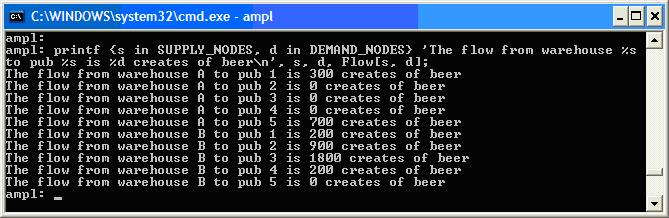
| > > | The printf command allows you to print text and values together in a format you can control. It uses the same printf format as C and Matlab. as C and Matlab. | ||||||||||||
| Changed: | |||||||||||||
| < < | The {\tt printf} command allows you to print text and values together in a format you can control. It uses the same {\tt printf} format as C and Matlab.
| ||||||||||||
| > > | src="printf.jpg" | ||||||||||||
| Changed: | |||||||||||||
| < < | You can print over sets or set expressions as well
| ||||||||||||
| > > | You can print over sets or set expressions as well | ||||||||||||
| Changed: | |||||||||||||
| < < | Printing to a File | ||||||||||||
| > > | src="printf_set.jpg" | ||||||||||||
| Changed: | |||||||||||||
| < < | All the output commands can be directed to a file. Adding {\tt > <filename>} to the end of an output command creates the file with the given name and writes to it. Subsequent output commands append output to the file by adding {\tt >> <filename>} to the commands. You should close your file when done so you can open it with another program. This is very useful for saving your solutions (in a useful format with {\tt printf}), for example
brewery.run\begin{verbatim} | ||||||||||||
| > > | Printing to a FileAll the output commands can be directed to a file. Adding> <filename> to the end of an output command creates the file with the given name and writes to it. Subsequent output commands append output to the file by adding >> <filename> to the commands. You should close your file when done so you can open it with another program. This is very useful for saving your solutions (in a useful format with printf), for example
| ||||||||||||
| # brewery.run reset; | |||||||||||||
| Line: 72 to 79 | |||||||||||||
| solve; | |||||||||||||
| Changed: | |||||||||||||
| < < | print 'TRANSPORTATION SOLUTION -- Non-zero shipments' > brewery.out; | ||||||||||||
| > > | print 'TRANSPORTATION SOLUTION -- Non-zero shipments' > brewery.out; | ||||||||||||
| display TotalCost >> brewery.out; | |||||||||||||
| Line: 82 to 88 | |||||||||||||
| Flow[s, d], s, d >> brewery.out; close brewery.out; | |||||||||||||
| Changed: | |||||||||||||
| < < | \end{verbatim} | ||||||||||||
| > > | |||||||||||||
| Changed: | |||||||||||||
| < < | Running {\tt brewery.run} in AMPL creates a file brewery.out. | ||||||||||||
| > > | Running brewery.run in AMPL creates a file brewery.out. | ||||||||||||
| -- MichaelOSullivan - 02 Mar 2008 | |||||||||||||
| Added: | |||||||||||||
| > > |
| ||||||||||||
| |||||||||||||
| Changed: | |||||||||||||
| < < |
| ||||||||||||
| > > |
| ||||||||||||



View topic | History: r8 < r7 < r6 < r5 | More topic actions...

 Copyright © 2008-2026 by the contributing authors. All material on this collaboration platform is the property of the contributing authors.
 Ideas, requests, problems regarding TWiki? Send feedback